I did not set out to build an MCP gateway. I set out to stop editing a glossary through a WordPress form. What follows is the honest path between those two points — the decisions, the double-booked permissions, the questions I still have not fully answered. It is one build, reported from the inside.
The whole thing started with a chore.
I run a glossary of agentic-web terms. It lives in WordPress. Adding, editing, and deleting entries through the WordPress admin is fine for one term and tedious for fifty. I wanted a faster door — something I could talk to, rather than a form I had to click through.
The obvious answer was the REST API. WordPress exposes one; I could script against it and be done in an afternoon. But we are in the middle of the agentic-web shift, and MCP is turning into the USB port for this era — the standard plug an agent expects to find. Given that, wiring the glossary as a plain REST script felt like laying a proprietary cable when a universal socket was right there. It would have been a shame not to use it.
So the real question was never "REST or MCP." It was where the MCP server should live. And that question turned out to be the whole story.
The easy version, and the line I left in it
The fastest path is an MCP server inside WordPress — a plugin, tools wired straight to the database through the existing REST layer. I built that first. It worked within an afternoon, exactly as promised.
It also contained one line I wrote on purpose and left in on purpose:
php
'permission_callback' => '__return_true', // anyone can call this endpointThat was not laziness. When the MCP server lives inside WordPress, the security boundary runs through WordPress — between the MCP endpoint and the rest of the application — and you have to build and hold that boundary yourself, in PHP, in the same process that renders your blog. __return_true was me deferring that work to see the thing run. It ran. And then the open door sat there, and I kept noticing it.
That noticing is where the second version began.
Leaving the house
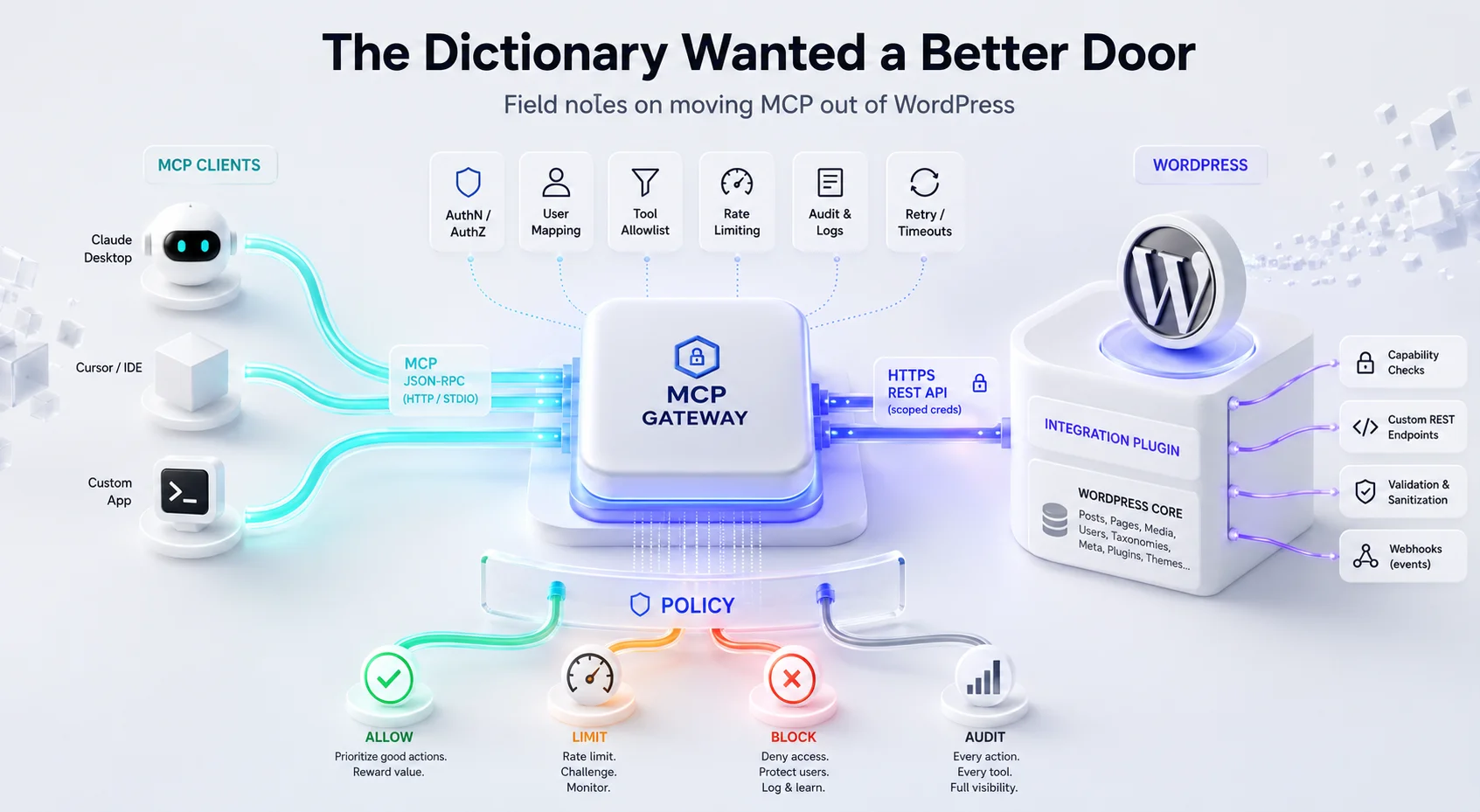
The alternative is blunt: the MCP server does not live in WordPress at all. It is a separate process, on a separate host, that stands in front of WordPress like a gateway. The agent talks only to the gateway. The gateway holds the credentials to WordPress and decides what to let through. WordPress itself can disappear from the public internet entirely.
That move solves __return_true by making it irrelevant — the public thing is no longer WordPress, it is a gateway that has authentication from its first minute. But "just move it out" hides six problems I only met once I was actually building. None of them are in the simple version. All of them are the price of the boundary.
1. The gateway has to prove who it is — and WordPress handed me the answer
An in-WordPress server inherits WordPress's own session. A separate process does not. It has to authenticate to WordPress somehow, as some user, with some credential I now have to store and protect.
This is where WordPress's Application Passwords quietly saved the design. They gave me a first-class way for an external process to authenticate as a real WordPress user without touching the main password or hand-rolling a token scheme. The gateway holds the Application Password; the agent never sees it. One built-in feature turned a nasty problem into a boring one.
2. Two permission systems, pointing in different directions
Then the Application Password raised a subtler problem — the one I think is the real lesson of the whole build.
In plain WordPress there is one axis of permission: a user is a subscriber, or an editor, or an admin. That is the whole model.
The moment the gateway sits in front, a second axis appears, perpendicular to the first. WordPress still asks "is this user an admin or a subscriber?" But the gateway now has to answer a different question: who reached me through MCP, which tools are they allowed to call, and why should they have that tool at all? Those are not the same question. A caller can be, from WordPress's side, a single Application-Password user — while, from the gateway's side, they might deserve access to list_terms but not delete_term.
The in-WordPress version never forces you to see this, because the two axes are collapsed into one. Pulling the server out splits them apart, and you have to design the second one deliberately. This is the part I would tell anyone starting: the hard problem of an MCP gateway is not transport. It is that you have just acquired a permission model you did not have yesterday.
3. I left WordPress, but I could not leave its REST layer
There is a fantasy version of "move it out" where the gateway is clean and WordPress-free. Reality is stickier. The gateway still has to talk to WordPress, and that meant a choice with no free option:
- accept WordPress REST as-is and shape my tools around it, or
- build my own layer in front of it — either a thin REST facade, or, absurdly, a small extra MCP inside WordPress just to expose the operations the way I wanted.
I went with a facade in the gateway, mapping tools onto WordPress REST while keeping the secrets on my side. But the point worth reporting is that leaving WordPress does not mean escaping WordPress. Its data model follows you out the door.
4. The questions you have to answer before writing code: CORS, Cloudflare, and who is even calling
Some of this build happened before a single line of Go — in the topology. An MCP server that used to be a private endpoint inside WordPress is now, potentially, a public process on its own host. That reframes everything: CORS rules, what sits in front (Cloudflare, a reverse proxy, TLS), and the question underneath all of them — who is actually going to call this?
Because a publicly exposed MCP server is a new attack surface. Not a variation on WordPress's attack surface — a genuinely new one, speaking a protocol most existing security tooling does not yet inspect. In the plugin version this question is muffled, because the endpoint hides behind WordPress's own front door. Pull it out, and you have to decide, explicitly, who is on the other side of the socket before you open it.
5. Cache: the gateway acts, but on what version of the truth?
Here is one I still have not fully settled. The gateway performs actions — but on what data? If it caches glossary state for speed, an agent can act on a term that changed a minute ago. If it never caches, every call is a round trip to WordPress. The options are all imperfect: don't cache; cache but signal staleness somehow; cache for a bounded time and accept a window of wrongness. For a glossary the stakes are low. For a gateway fronting anything transactional, this is the whole ballgame, and I do not think there is a default-correct answer — only a default-correct answer for a given tool.
6. No hooks — the separation cuts both ways
The cleanest thing about pulling MCP out of WordPress is also the most limiting. Outside the process, I get real isolation: the agent cannot touch WordPress internals directly. That is the feature.
But it is also the cost. I lost access to everything WordPress gives you inside the process — hooks, filters, the whole event model a plugin takes for granted. Standing outside, I cannot hang logic on a WordPress action; I can only call it from the front and react to what it returns. The isolation I wanted for security is the same isolation that walls me off from the platform's own machinery. You do not get one without the other.
Where this actually landed
I started wanting a nicer way to edit a glossary. I ended up holding a question I did not have that morning: where should the tool layer for an agent live — inside the application it serves, or in front of it as its own citizen?
I do not think there is a universal answer, and I have stopped looking for one. Inside is simpler and inherits the platform's identity and hooks for free. In front gives you a real trust boundary, a place to hold secrets, and independent lifecycle — and hands you, in exchange, a second permission model, a cache question, and a new public surface to defend. For the glossary, in-front won, but only because I already knew I wanted more than one backend behind it eventually.
What I am testing next
This is not finished, and I would rather say where the edge is than pretend it is a product.
The next thing I want to know is whether MCP comfortably carries binary payloads — files, not just text and JSON. If that holds, the test after it is the one I actually care about: generating images on the backend with an LLM and pushing them back through MCP into an effects panel. That is a very different load than shuttling glossary terms, and I do not yet know where it strains.
If it breaks, that will be the next field note. Which is the honest state of most of this work — the map is drawn one traversed step at a time, and the interesting part is always the step you have not taken yet.
This is a build report from a working system: an MCP gateway in front of a WordPress-hosted glossary of agentic-web terms. The failures and open questions are mine, from the build described. If they are familiar, good. If they are not yet, they will be the first time you move an MCP server out of the application it serves.